
Text messages from Realynq
Realynq texts a client only after they agree, in writing, inside their own Realynq account. This page is the public record of that program: the step and its exact words, with screenshots, what Realynq sends, how to stop, and who is behind it.
Updated
1. The program at a glance
- Program
- Realynq client messages
- Who sends them
- Realynq Technologies Inc., and through Realynq your own real estate agent, from Realynq’s registered local number or from the agent’s own Realynq number.
- Who receives them
- Realynq account holders, home buyers and sellers, who verified a mobile number and agreed to texts in their own account. Nobody else.
- What they are about
- Showing confirmations and changes, documents to review or sign, deadline reminders, and messages your agent writes to you. Never marketing to the public, never cold outreach, no purchased or shared lists.
- How you agree
- An optional checkbox, unticked by default, on the Finish setting up your account page after your mobile number is verified, or the Text messages switch in Profile & security. Agreeing is optional and never a condition of using Realynq or of any purchase.
- Frequency
- Message frequency varies with your showings, documents, deadlines and your agent’s messages. Realynq sends a client at most 20 texts a day.
- Cost
- Message and data rates may apply.
- Opt out
- Reply STOP to any text.
- Help
- Reply HELP to any text, or write to support@realynq.com.
- Policies
- Privacy Policy and Terms of Service, both public, on this website.
2. Who is behind these messages
Realynq Technologies Inc. is a real estate technology company based in Houston, Texas. It makes Realynq, a home search service for buyers (Homie), a financing explainer (Lee, coming soon) and Homie Pro, a workspace for licensed Texas real estate agents. Realynq is not a brokerage or a lender. The About page describes the company, and the Contact page lists every way to reach it.
- Legal name
- Realynq Technologies Inc.
- Based in
- Houston, Texas
- Website
- realynq.com
- Support
- support@realynq.com
- Everything else
- info@realynq.com
3. Who texts you, and about what
Realynq texts you about showings, documents and deadlines, and passes on messages from your real estate agent when your agent works with you in Realynq.
A message from your agent begins with their name: “[Agent name] via Realynq: Confirming our showing at 2 pm tomorrow. Reply STOP to opt out.” It comes from Realynq’s number or from your agent’s own Realynq number, a local number registered with the carriers in your agent’s name.
Realynq texts only people who agreed. There is no keyword sign-up, and no purchased or shared lists.
4. How you agree, step by step
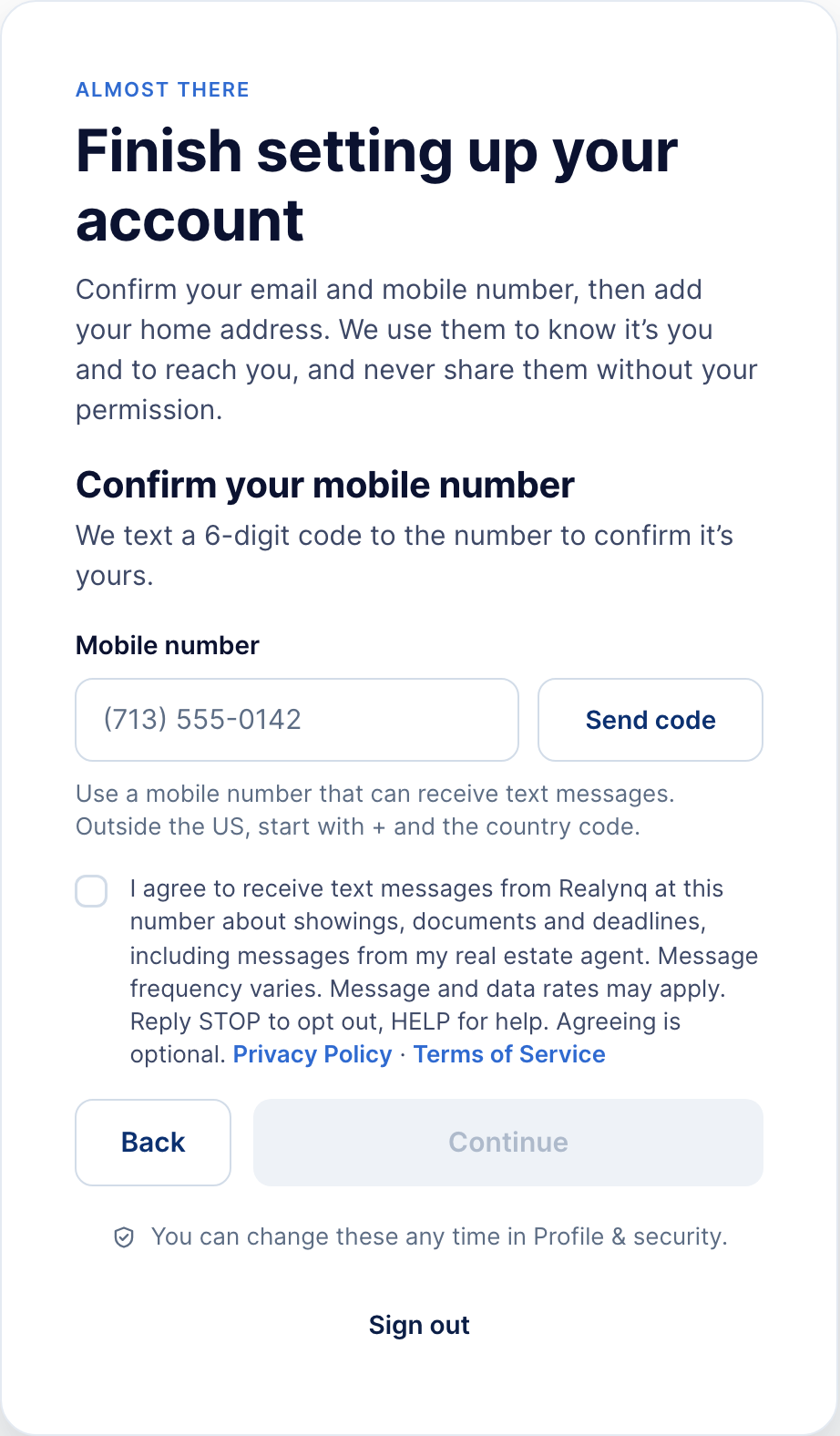
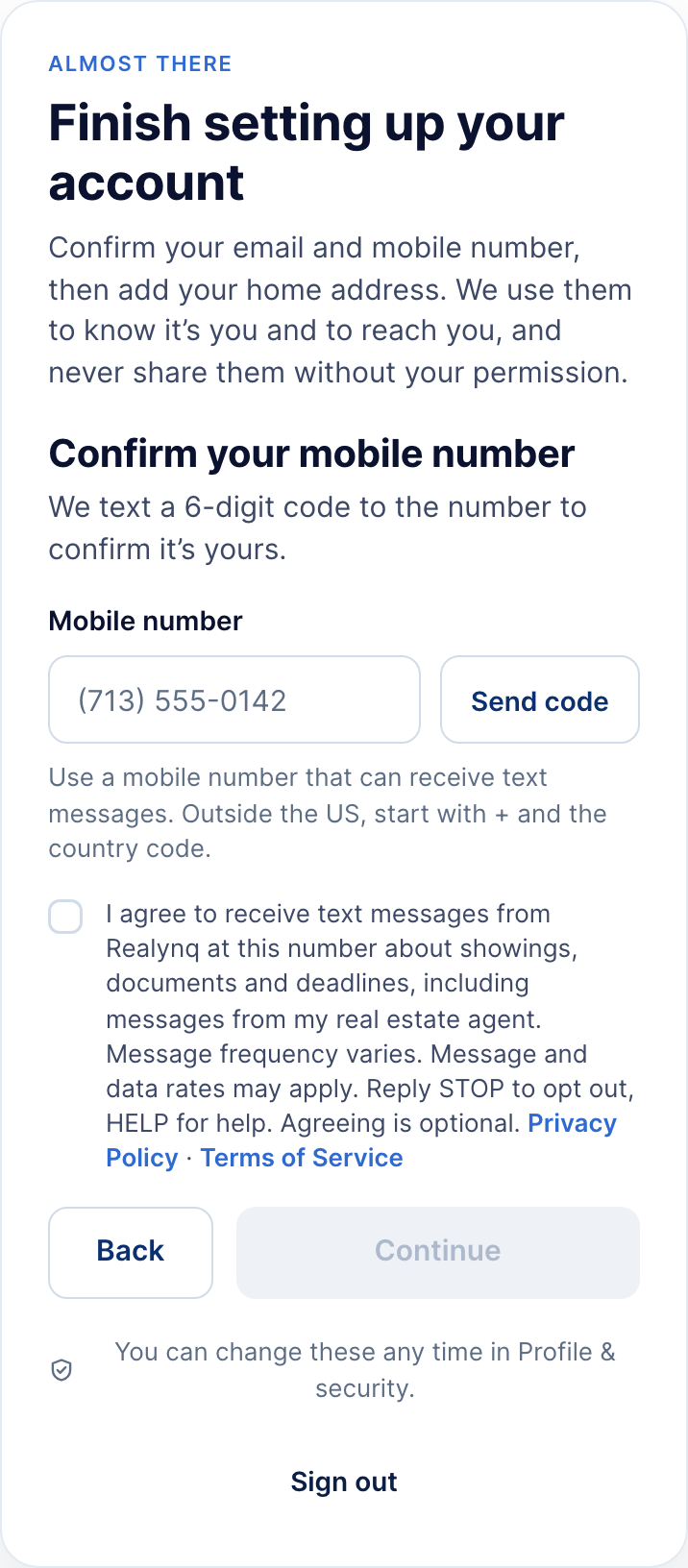
You agree online, in your own Realynq account, which needs you to sign in. On the Finish setting up your account page you enter your mobile number and verify it with a 6-digit code texted to that number. You may then tick an optional box, which is unticked until you tick it. The words beside it read:
“I agree to receive text messages from Realynq at this number about showings, documents and deadlines, including messages from my real estate agent. Message frequency varies. Message and data rates may apply. Reply STOP to opt out, HELP for help. Agreeing is optional.”
The Privacy Policy and the Terms of Service are linked beside the box. Agreeing is optional: you can use Realynq without it. The box is separate from the agreement to the Terms of Service you gave when you created the account.
- Create a Realynq account at realynq.com and confirm your email address. Agreeing to texts is not part of this step.
- On Finish setting up your account, enter your mobile number and press Send code. Realynq texts a 6-digit code to that number.
- Enter the code. The number is now verified, and the optional Text messages box below it can be ticked. It starts unticked.
- Tick the box if you want texts, then press Continue. Realynq records your choice for that one number, with the date and the version of the words you saw.
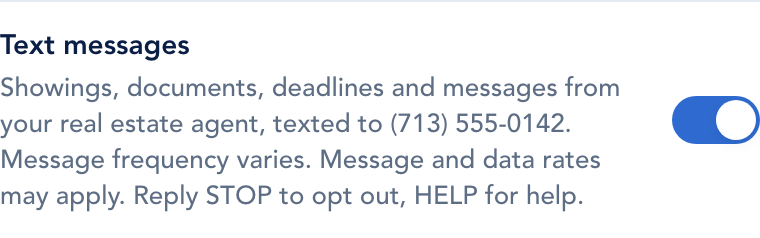
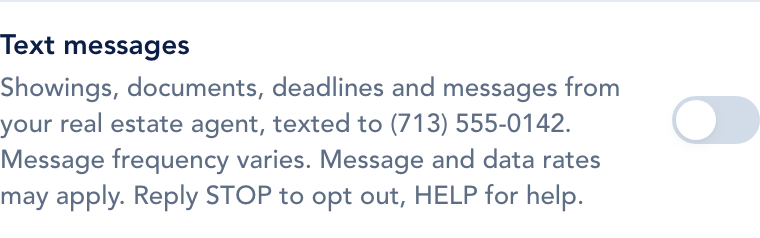
- In Profile & security the same choice is the Text messages switch, on after you agreed and off otherwise. Switch it off at any time to stop, or on to agree again.
The screenshots below are the step as it appears in the Realynq web app, captured November 24, 2026. Each opens as a full-size image at its own public address.
I agree to receive text messages from Realynq at this number about showings, documents and deadlines, including messages from my real estate agent. Message frequency varies. Message and data rates may apply. Reply STOP to opt out, HELP for help. Agreeing is optional. Privacy Policy · Terms of Service
5. What Realynq records
Realynq records your choice for the one verified number on your account, with the version of the words you saw, when you made the choice and where (Finish setting up your account, or Profile & security). Every later change, including a STOP, is added to that history. If you change your number, the agreement does not carry over: you agree again for the new one.
Delivery logs keep the last four digits of the number, never the whole number or the words of a message. An incoming reply is kept only until it has been routed to the right place.
7. Changing your mind
Profile & security has a Text messages switch with the same choice. Switch it off to stop texts, or on to agree again. Open Profile & security after signing in.
8. STOP and HELP
Reply STOP to any text to stop them. It withdraws your agreement for that number; STOPALL, UNSUBSCRIBE, CANCEL, END and QUIT work the same way. Reply START to agree again after a STOP.
Reply HELP for help, or write to support@realynq.com. Realynq answers a STOP or HELP with a confirmation and nothing else: no reply of yours signs you up, and replying YES to a message is not an opt-in.
- After STOP
- “You have successfully been unsubscribed. You will not receive any more messages from this number. Reply START to resubscribe.”
- After HELP
- “Reply STOP to unsubscribe. Msg&Data Rates May Apply.”
- After START
- “You have successfully been re-subscribed to messages from this number. Reply HELP for help. Reply STOP to unsubscribe. Msg&Data Rates May Apply.” A START restores only an agreement you ended with STOP; it never creates one.
9. Message frequency and rates
Message frequency varies with your showings, documents, deadlines and your agent’s messages. Message and data rates may apply. Messages that Homie drafts for your agent go out only between 8 AM and 8 PM Houston time and at most once a day; a message your agent writes is sent when they send it.
Carriers are not liable for delayed or undelivered messages. Realynq texts work with the major US carriers.
10. Sample messages
Every text names Realynq. The samples below are the program’s registered examples; the parts in square brackets are filled in for you.
- Realynq: [Agent name] confirmed your showing at [address] on [day] at [time]. Details: https://realynq.com/t/[code] Reply STOP to opt out.
- Realynq: [Agent name] sent [document name] for your review and signature: https://realynq.com/closing/[transaction id] Reply STOP to opt out.
- Realynq: Reminder from [Agent name]: the option period for [address] ends [date] at [time]. Reply HELP for help, STOP to opt out.
- Realynq · [Agent name]: [message your agent wrote to you]. Read and reply in the Realynq app: https://realynq.com/messages Reply STOP to opt out.
- Realynq: Your showing at [address] moved to [day] at [time]. [Agent name] will meet you there. Reply STOP to opt out.
- [Agent name] via Realynq: Confirming our showing at 2 pm tomorrow at [address]. Reply STOP to opt out.
11. Where this program runs
This page is published at realynq.com/compliance/sms-opt-in and needs no sign-in. Realynq runs the same software on two hosts, each with its own registered number and messaging service. The words of the agreement, the Privacy Policy and the Terms of Service are identical on both.
- Production
- realynq.com, served by api.realynq.com. The service people use.
- Pre-release
- uat.realynq.com, served by api-uat.realynq.com. The same software, where new releases are checked by Realynq’s own team and invited testers before they reach realynq.com; its texts go to those testers’ own verified numbers only.
The screenshots on this page were taken from Realynq’s own build of this software on November 24, 2026 and show the step as both hosts render it.
12. Questions
For anything about text messages from Realynq, write to support@realynq.com or to info@realynq.com. A person replies.